2013 Peter Keffler Handicap Challenge

Will be held at Clacton club on 14th May 2013 and the following 2 Tuesday evenings.
This competition known as the Peter Keffler Challenge was introduced on Peter’s 80th birthday and has been contested every year since.  All members are encouraged to participate, so please come along for a punctual 7:30pm start when the first pairings of the evening will be made.

N.B. The results of this event will be published here in the club blog pages and NOT in the table of additional member games at necl.org.uk/Clacton.
Due to the handicap nature of this event, these games do not qualify for grading.

Structure
John Lambert recently emailed out an outline structure summarised in the extract below.:-

The event will be the usual handicap with 80 minutes being split between the two players in the ratio of their Jan 2013 standard play grades, the higher graded person receiving the lesser time. All players graded below 99 will be adjudged as having a grade of 60 for this event. ( eg if Phil 160 was paired with Alan 60 then Alan would have 58mins and Phil 22mins).
There will be 6 rounds using the Swiss method of pairing. If a player is unable to attend all three days he will be able to take a maximum of two half point byes but must state these at the outset. A player attending but not paired due to an uneven number of players will receive a full one point bye.
Ties will be decided by playoff in the following week with 40 minute game(s) and times split by grade, but a 4-way tie tie will result in a random draw for semi-final/final on a knockout basis.
Players in each playoff game will toss for colours.

Pairings and Timings
John again volunteered me+laptop for this, so I’ll be using JaVaFo pairing engine, Dutch variant (see here, section C04) – or John will use paper and pencil if we get a power cut!
The table of timings is shown below.  Click on the image for a larger/clearer view.
Your clock time in minutes is found along ‘your row’ under the column corresponding to your opponents seed number. Your opponents clock time is found along ‘their row’ under the column corresponding to your number.

Timings

Updates
14/05/13  –  Ordered Cross Table after Round 2
21/05/13  –  Ordered Cross Table after Round 4
28/05/13  –  Ordered Cross Table after Round 6  –  we have a tie!
18/06/13  –  Presentation of Shield

Chess Whimsies

Two great senior guys from Writtle, Ivor Smith and Jim Howson, kindly collated these 10 challenging chess puzzles.

(Note – the solutions are not necessarily unique)

Q1.

Place the Black King
(1) Where he is stalemated
(2) Where he is mated
(3) Where he can be mated in one move
(4) Where he can be mated in two moves

Q2. White mates in 2

Q3. White’s pieces fell on the floor. Just a King and a Pawn. Place them back in the correct position on the board and it’s White to play and mate in 2.

Q4. White takes back his last move and then mates in two moves.
Watch out for the unexpected.

Q5. A group of experienced players gathered round the board and racked their brains in vain efforts to discover a series of four legal moves from each player (White of course moving first) which could have brought about the position. Can you find the moves which had been played ?

Q6. Place all 16 White pieces on the board in legal positions
(i.e. Bishops on opposite colours and no pawns on the first or 8th ranks)
so that none of them can move.

Q7. At the start of a game, with White moving first and Black copying his
first three moves exactly, how can White mate with his fourth turn?

Q8. If White starts with the moves
1) f3 2) Kf2 3) Kg3 4) Kh4
which first three moves must Black play in order to give mate with his fourth?

Q9. Alphametics involving chess terms are few and far between but here is one.

BISHOP +
BISHOP
————
=   KNIGHTS

There are 10 letters involved in this simple addition sum.
Your task is to find which of the numerals 0 to 9 each letter represents.

Q10. Place 4 queens and a rook on the board so that every square is either occupied or attacked.

Update: 04/01/2013
Need to check your answers? –
Ivor has now released the solutions. You can find them here.

Displaying Board Positions and Games

‘Plugins’ such as ‘Chess Tempo Viewer‘, ‘RPB Chessboard‘, ‘Embed Chessboard‘, etc. provide chess-graphics for your posts, to show single game positions, or a whole game animated on one board. Depending on the plugin you wish to use, you can either
a) insert your FEN text within special tags (must be exactly right to be picked up and show the board in your post – if you only see a text string instead of a diagram when you preview your post, double check that you have entered a valid string)
b) select the ‘Chess Diagram’ or ‘Chess Game’ icons from the post/page block editor.
c) paste FEN text into the field provided from options the tool provides within the block editor.
All as described in the above links to these tools.

Display a single game position

This diagram was set up using ‘RPB Chessboard‘ by selecting ‘Chess Diagram’ from edit options and arranging pieces in the displayed graphic.

This diagram was set with the Chess Tempo Viewer by using ctpgn tags as described here and shown below for the same position using the following tagged FEN text.

===============================

Display an animated game

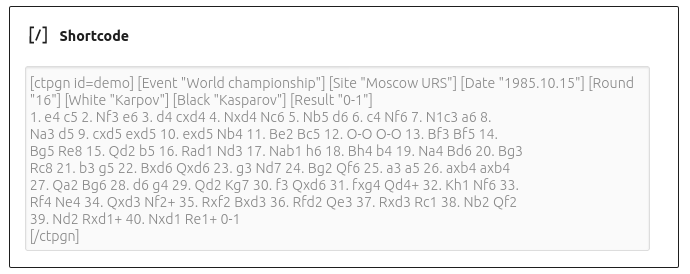
The following animated graphic of a full game was set up for the Chess Tempo Viewer by inserting pgn text string for the game between ctpgn tags within a ‘shortcode block’.


Using similar examples your readers can single-step forward or backwards through your games using the > and < buttons, or click on the auto-play and stop buttons.

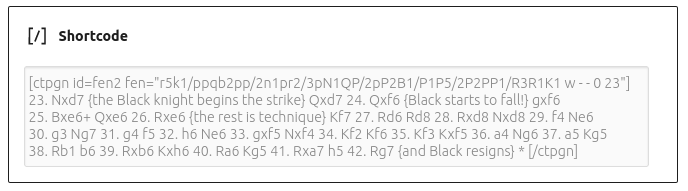
A further example shows this viewer used to give a start position/study with follow-on moves and comments as prepared in the ‘shortcode block’ below.

_____

updates:-

Jan 2023, ‘removed references to ‘ChessOnline’ – disabled after identified by UKC to be the cause of admin and user WordPress logins failing, and other issues (though effect not replicated on backup server). Authors should use the ‘Chess Tempo Viewer’ instead.
Nov 2018, added further choice to use Chess Tempo Viewer
Dec 2013, use of copgn;
Dec 2012, FEN Reader replaced by ChessOnline;


Test

This submission is to test creation of posts in author role.
You can save texts as draft until ready to publish.
You can also edit or delete your published posts.
Start by selecting ‘Posts’-> ‘Add New’ from your dashboard.
Be sure to select the most appropriate category before publishing!